
给企业做网站的业务员识万物扫一扫
unity3d入门教程四
- 10.1坐标与旋转
- 10.2物体的运动
- 10.3(练习)掉头飞行
- 11.1向量
- 11.2向量间运算
- 11.3向量夹角
- 11.4物体的指向
- 11.5(练习)飞向目标
- 12.1屏幕坐标
- 12.2屏幕的边界
10.1坐标与旋转

比如,节点的坐标用 Vector3 类型表示
transform.position = new Vector3(0, 1.0f, 0);

比如,
transform.position = new Vector3(0, 1.0f, 0);transform.eulerAngles = new Vector3(0, 0, 90f);

给子弹指定本地坐标:
transform.localPosition = new Vector3( 0, 1.0f, 0);
飞机发射子弹认为其有相对的运动关系
本地坐标也是相对坐标,相对于父节点的坐标,并不是世界坐标即相对于整个场景的坐标
相对旋转如下所示

结论:通过
transform.eulerAngles= new Vector3(x,y,z)
设置的角度是绝对角度(类似于绝对路径)
结论:通过
transform.localEulerAngles= new Vector3(0f,agent,0f);
设置的角度是相对角度(类似于相对路径)
10.2物体的运动
Update()刷新时调用


10.3(练习)掉头飞行


示例代码 (也可以在项目源码的 Assets \ Script \ 目录下查看 )
public class MyJet : MonoBehaviour
{private bool upward = true; // 飞行的方向// Start is called before the first frame updatevoid Start(){}// Update is called once per framevoid Update()
{
//整个camera总高度10,飞机在中间上走5个格就到边界了
//如果到达上边界就换向if(upward && transform.position.y > 5 ){upward = false;transform.localEulerAngles = new Vector3(0, 0, 180);}
//若到达下边界就换向if(!upward && transform.position.y < -5){upward = true;transform.localEulerAngles = new Vector3(0, 0, 0);}float step = 1.6f * Time.deltaTime; // 每帧移动的距离transform.Translate(0, step, 0, Space.Self );}
}
11.1向量
运动计算基础向量运算
控制物体运动,方向要通过向量运算计算得到


直接使用 API 求长度:
float len = v.magnitude;
其中V是自定义的向量
1 向量的长度
Vector3 a = new Vector3(2f, 2f, 0);
float len = a.magnitude;
Debug.Log("长度: " + len);
注意,C# 里的‘属性’,其实内部是一个 Getter/ Setter 方法。


2 向量标准化
Vector3 a = new Vector3(2f, 2f, 0);Vector3 b = a.normalized;Debug.Log("标准化为: " + b.ToString("F3") );Debug.Log("标准化为: " + b );
如果直接打印显示不全
几个常用的标准向量 (静态常量)
Vector3.right  ,即 Vector3 (1, 0, 0)
Vector3.up  ,   即 Vector3 (0, 1, 0)
Vector3.forward  ,即 Vector3 (0, 0, 1)
11.2向量间运算
两个向量间的运算
减法是经常用到的用来求两者之间的距离


乘法分为3种:
标量乘法 b = a * 2 (x,y,z分别成2,相当于变长变短)
点积 c = Vector3.Dot ( a, b )
差积 c = Vector3.Cross ( a, b )

本示例代码挂载到飞机上,飞机和球物体都是根节点下的节点
示例代码
GameObject target = GameObject.Find("球");// 目标位置
Vector3 p2 = target.transform.position;// 自己位置
Vector3 p1 = this.transform.position;// 方向向量
Vector3 direction = p2 - p1;Debug.Log("物体间的距离: " + direction.magnitude);
11.3向量夹角


示例: 求从 a 到 b 的夹角
Vector3 a = new Vector3(2, 2, 0);
Vector3 b = new Vector3(-1, 3, 0);
float angle = Vector3.SignedAngle(a, b, Vector3.forward);
要注意此处求得是带正负号的夹角
若只求夹角不含方向即正负号如下
float angle = Vector3.Angle(a, b);
求从a到b 的夹角
Vector3 a = new Vector3(2, 2, 0);Vector3 b = new Vector3(-1, 3, 0);// float angle = Vector3.Angle(a, b); //只求夹角无方向正负float angle = Vector3.SignedAngle(a, b, Vector3.forward); //有正负
求从b到a的夹角
float angle = Vector3.SignedAngle(b, a, Vector3.forward);
求从a与 x轴正向的夹角
float angle = Vector3.SignedAngle(a, Vector3.right, Vector3.forward);//a到x轴正向逆时针,-45度
其中,Vector3.right 就是指向X轴正方向的单位向量
11.4物体的指向


注意物体的坐标向量和世界坐标向量是不同的

1 打印显示物体的3个坐标轴向量
Debug.Log("x轴向量: " + transform.right.ToString("F3"));
Debug.Log("Y轴向量: " + transform.up.ToString("F3"));
Debug.Log("z轴向量: " + transform.forward.ToString("F3"));
这三个向量都是标准向量,代表物体的三个坐标轴的方向
代码挂载到飞机节点上
2 旋转机头,指机头指向目标物体
 // 确定脸的朝向 ( 在本例中,Y轴方向即为脸的朝向)
Vector3 face = this.transform.up;// 方向向量 ( 飞机  小球 )
GameObject target = GameObject.Find("球");
Vector3 direction = target.transform.position - this.transform.position;// 机头要旋转的角度
float angle = Vector3.SignedAngle(face, direction, Vector3.forward);// 旋转
this.transform.Rotate(0, 0, angle);
11.5(练习)飞向目标

private bool upward = true; // 飞行的方向void Start(){// 确定脸的朝向 ( 在本例中,Y轴方向即为脸的朝向)Vector3 face = this.transform.up;// 方向向量 ( 飞机 小球 )GameObject target = GameObject.Find("球");Vector3 direction = target.transform.position - this.transform.position;// 机头要旋转的角度float angle = Vector3.SignedAngle(face, direction, Vector3.forward);// 旋转this.transform.Rotate(0, 0, angle);}// Update is called once per framevoid Update(){//if (upward && transform.position.y > 5)//{// upward = false;// transform.localEulerAngles = new Vector3(0, 0, 180);//}若到达下边界就换向//if (!upward && transform.position.y < -5)//{// upward = true;// transform.localEulerAngles = new Vector3(0, 0, 0);//}float step = 1.6f * Time.deltaTime; // 每帧移动的距离transform.Translate(0, step, 0, Space.Self);}
12.1屏幕坐标


如何获取一个物体的屏幕坐标?
Vector3 pos = transform.position;
Vector3 screenPos = Camera.main.WorldToScreenPoint(worldPos);#获取主摄像机将世界坐标转换成窗口屏幕(运行生成的窗口的屏幕)中的坐标
世界坐标系一屏幕中间点为原点
而屏幕坐标系以窗口屏幕左下角为原点
屏幕坐标是以像素为单位的
示例代码
public class MyJet : MonoBehaviour
{// Start is called before the first frame updatevoid Start(){int screenW = Screen.width;int screenH = Screen.height;Debug.Log("屏幕: " + screenW + ", " + screenH);// 世界坐标:  UnitVector3 worldPos = transform.position;  // 屏幕坐标:像素Vector3 screenPos = Camera.main.WorldToScreenPoint(worldPos);// 注意:屏幕坐标的单位是像素Debug.Log("世界坐标: " + worldPos);Debug.Log("屏幕坐标: " + screenPos);}// Update is called once per framevoid Update(){}
}
12.2屏幕的边界

上下界限可确定,但左右需要通过长宽比得到


运行后
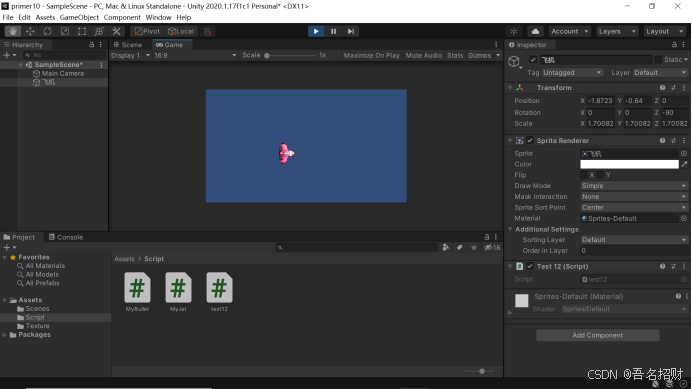
public class test12 : MonoBehaviour
{private bool toRight = true;//换向标志// Start is called before the first frame updatevoid Start(){//当前节点对象绕z轴顺时针旋转90度transform.eulerAngles = new Vector3(0, 0, -90);}// Update is called once per framevoid Update(){//将当前对象世界坐标转换成屏幕坐标Vector3 sp = Camera.main.WorldToScreenPoint(transform.position);if (toRight && sp.x > Screen.width){toRight = false;transform.eulerAngles = new Vector3(0, 0, 90);}if (toRight && sp.x < 0){toRight = true;transform.eulerAngles = new Vector3(0, 0, -90);}float step = 1.8f * Time.deltaTime;//注意机头指向,沿着自己的Y轴指向前进transform.Translate(0, step, 0, Space.Self);}
}